How to read this sheet
Update 10 rebuilt the flight UI. A key named in a 2024 clip can still work, or the same action can now be a button. The sheet below marks where several public flights agree, and where an older developer comment disagrees with the later community sheet.
Inputs repeated across public flights
| Input | Reported action | Evidence window |
|---|---|---|
| E | Engines on or off | November 2026 community sheet; matches flight videos that name an engine key |
| P | Pushback | Named on camera in 2024 flights and kept in the later sheet |
| W / S | Throttle up or down | 2024 flights and the later sheet |
| A / D | Rudder and ground steering | 2024 flights and the later sheet |
| Mouse | Pitch and roll in the air | 2024 and 2025 flights |
| L | Lights | Later community sheet |
| On-screen UI | Flaps, gear, spoilers | Later sheet. Some 2025 flights also showed these as buttons |
| C | Arm flight controls or yoke mode | Later community sheet. Older clips also use C for a free camera |
Older reports that may have moved
- In August 2024 the developer replied that cockpit view was the 2 key, not the 1 key. Do not assume 2 still opens the cockpit after the UI revamp. Use the camera menu if that is what the current HUD shows.
- A July 2024 flight described Z as advanced controls. Z is not in the November 2026 sheet. Try it only if you see that binding, and do not treat it as required for a normal circuit.
- Some 2025 flights raised the gear with G. The later sheet points at the on-screen gear control instead. Follow the control you can see.
A ground flow that matches those inputs
- Park, and set the brake if the UI has one.
- Press E and wait until the engines are actually running.
- Open lights with L. Taxi needs a taxi light. A beacon belongs with the engines. Landing lights belong on the runway, not in the gate.
- Press P, ease off the gate, steer with A and D, then cancel pushback before you build taxi speed.
- Add small amounts of thrust with W. S reduces it. Full thrust while facing the terminal is the usual first crash.
- Press C if the nose ignores the mouse. That is the later report for arming the yoke.
- Line up, set takeoff flaps on the flight UI, and only then take the runway.
Cameras
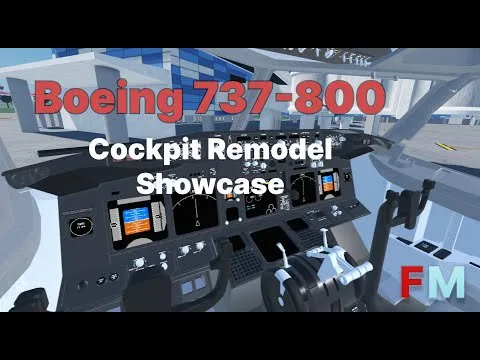
Public flights show exterior, cockpit, wing, gear, and cinematic angles. The official 737-800 cockpit showcase shows a PFD, an ND, a thrust-lever quadrant, and a yoke. Update 10 specifically calls out A350 cockpit work and 737 cockpit improvements. Interactive switches still vary by aircraft. A January 2025 flight found the cockpit viewable but not fully clickable, so do not plan a procedure that depends on clicking every overhead switch.
Mobile
The developer said Update 2, announced on 2 February 2025, would not be the mobile release, and that mobile would come in Update 3. A June 2025 flight states the game is on mobile. Touch controls replace some keys. Keep the throttle, gear, flaps, and camera reachable, and stay on a long runway until those buttons are familiar.
If the aircraft will not do what you asked
- Nose will not pitch: press C, and confirm you are not still in pushback.
- Spins on the taxiway: cut thrust and steer with rudder only.
- Pushback does nothing: confirm the engines and that the tail is not blocked.
- Lights are missing: open L again after the UI revamp. The panel may not be where an old video put it.
- Physics feel new: that is expected after the Update 10 physics rework. Relearn the flare in a narrow-body before you blame a key.